For some months we've been optimizing our workflows in the project with n8n, and because that new ‘name’ just popped up in my life, I said why not get to know each other and say "Hi!". So in the next few lines I plan to show how cool development tool can make your day to day life easier, from development to management and even organizing the processes in your house.
Author: Alexandru Minzatanu, Software Developer

Every day tasks automation with AI and no code

Alexandru Minzatanu - Software Developer
n8n isn’t just a developer tool — it’s a personal automation engine that cuts busy-work out of your day, at the office and at home. With drag-and-drop workflows, API integrations, and built-in AI, it turns repetitive tasks into hands-off processes. No more copy-pasting, manual updates, or chasing information across apps. From daily news briefings to auto-organizing your inbox or syncing tasks across tools, n8n handles the grunt work so you can focus on actual thinking. In short: if you're doing it twice, automate it once.

To start have 2 options:
- We go to https://n8n.io/ create an account and pay for the service to access the GUI interface.
- For the beginning open CMD and run: npx n8n (Node.js is needed)
- Access http://localhost:5678 in your browser and create an account (it’s local)
PS: n8n can be run locally, can be deployed somewhere you choose (is free to use), and can also be used as a service (under paywall)
Photo: Command line installing n8n

Now you should see the dashboard where you can define a workflow, save credentials for different applications you use, or set up a place to save the results. There are many applications that can be integrated: Teams, Discord, Google Sheets, Google Drive, Monday.com, Notion etc.
Photo: n8n dashboard overview

From that page, you can go in countless directions. For now, we’ll build a simple workflow to explore the possibilities—one that uses an AI agent to pull messages from Teams or Discord and turn them into action items. Click the Create workflow button to get started.
Photo: Empty n8n workflow editor

And now let’s add the first step in our workflow: click on Add first step, and choose the trigger of your workflow.
Photo: Trigger picker screen (choose how the workflow starts)

For this example I chose a schedule trigger, that runs the workflow at 8AM when I login in for work:
Photo: Schedule Trigger settings
As a next step I want to read all the messages that I have (I choose Discord for security reasons but it can be everything from Slack to Teams or even Facebook).
To make that happen you have to create a OAuth2 token in your Discord account (for Teams the same token is generated in Azure): https://discord.com/developers/.
After adding the auth to our step, it will look like this:
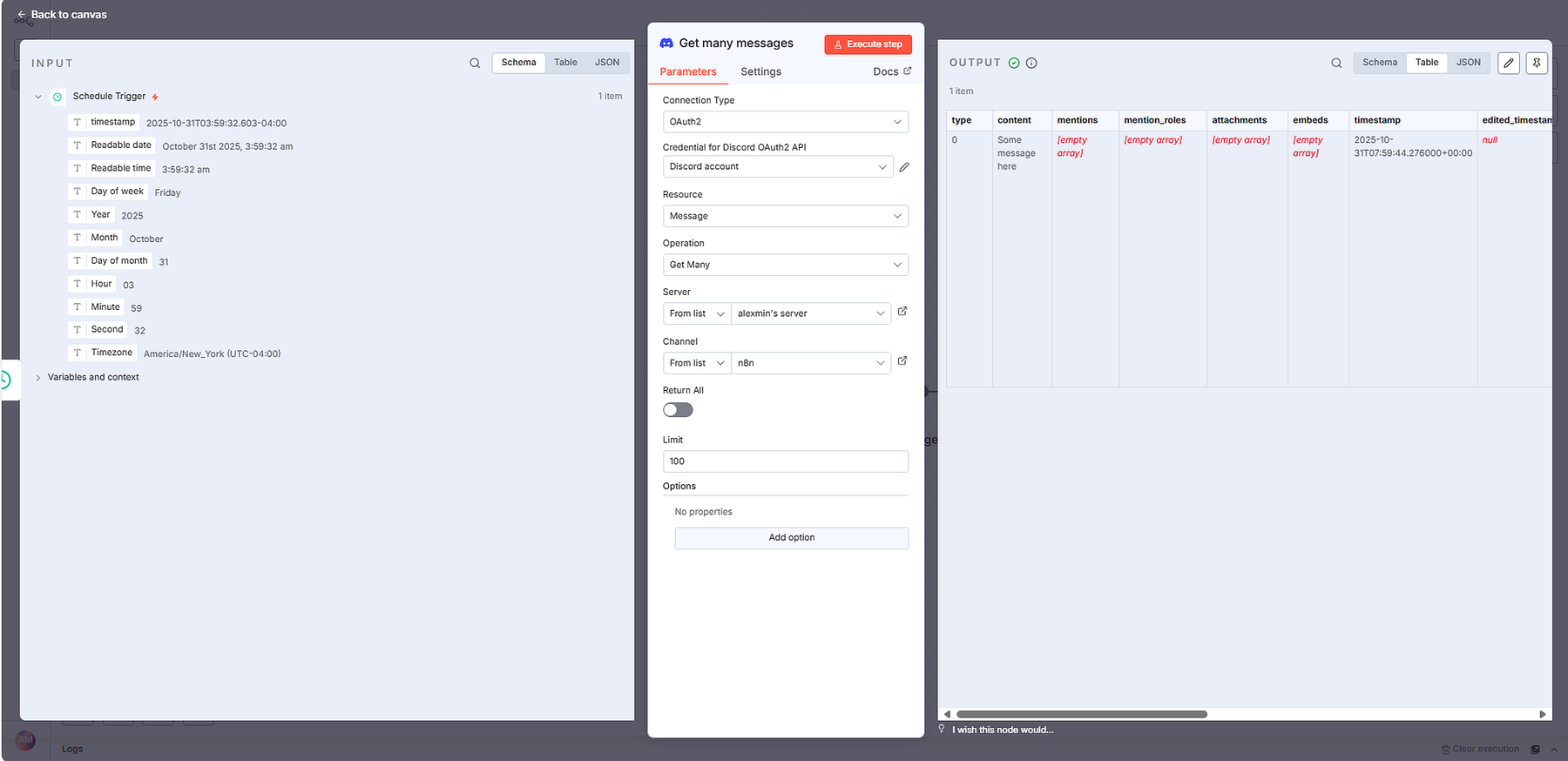

Now that we have all the messages, we can add a lot of actions to filter, aggregate or summarize the results, depending on what our needs are.
Photo: Workflow canvas with Schedule Trigger → Discord

Let’s filter a little bit: click on Data transformation and from the list select Edit fields.
Photo: Data transformation node list
Get only the contents of the messages:
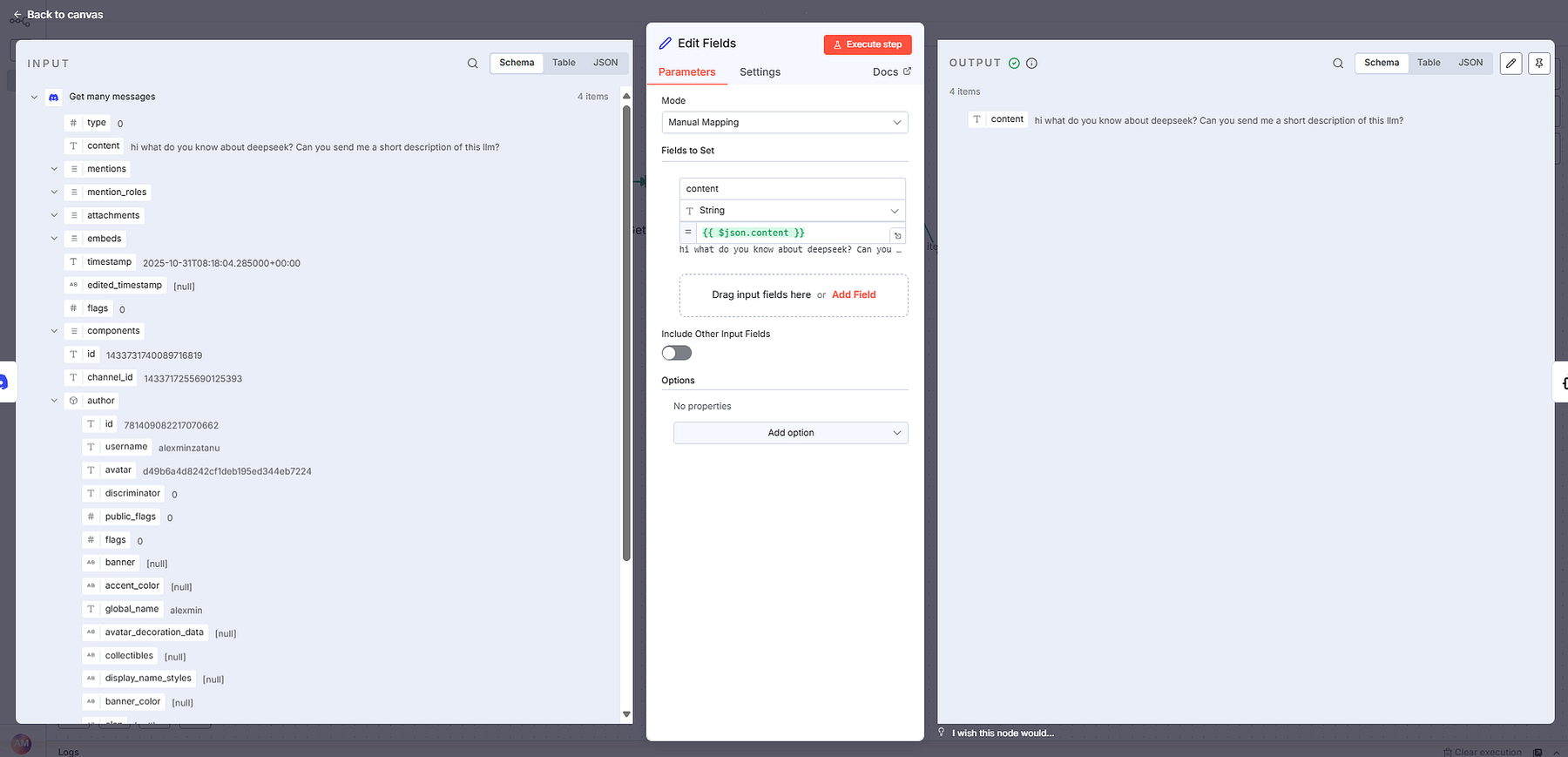

On the next step let’s add an AI Agent:
Photo: Step category menu

Take the step shown in the image:
Photo: AI Agent node configuration – prompt input and execution settings

Notice that at the bottom of this step is linked a model, in this case, Open AI Model. This model is linked to Open AI with an API Key (for this follow the steps from this page: Overview - OpenAI API).
Now, our n8n flow looks like this:
Photo: OpenAI Chat Model configuration

At this moment the workflow should look like:
Photo: OpenAI Chat Model configuration

Now, the workflow should take all our message from a specific channel, read them, take the content and ask an AI model to create a to do list for us for the current day. And in the meantime, we can enjoy our coffee :).
Let’s see the results. The messages from Discord channel:
Photo: Discord channel messages used as workflow input

The output of our workflow(after pressing the orange button “Execute workflow”):
Of course, the workflow is not perfect, but it is a good start and letting the AI read a long list of messages and extract only what is important for you, is a blessing.
N8n opens the door to a huge range of possibilities, whether you’re automating small personal tasks or building complex, production-grade workflows. Its flexibility, wide set of integrations, and the ability to mix no-code steps with custom logic make it a strong choice for anyone who wants real control over their automation. As you keep exploring, you’ll find that almost anything can be connected, automated, or improved with a bit of creativity. n8n isn’t just a tool, it’s a platform you can grow with, adapt to your needs, and use to streamline work in ways that matter.

